
Description
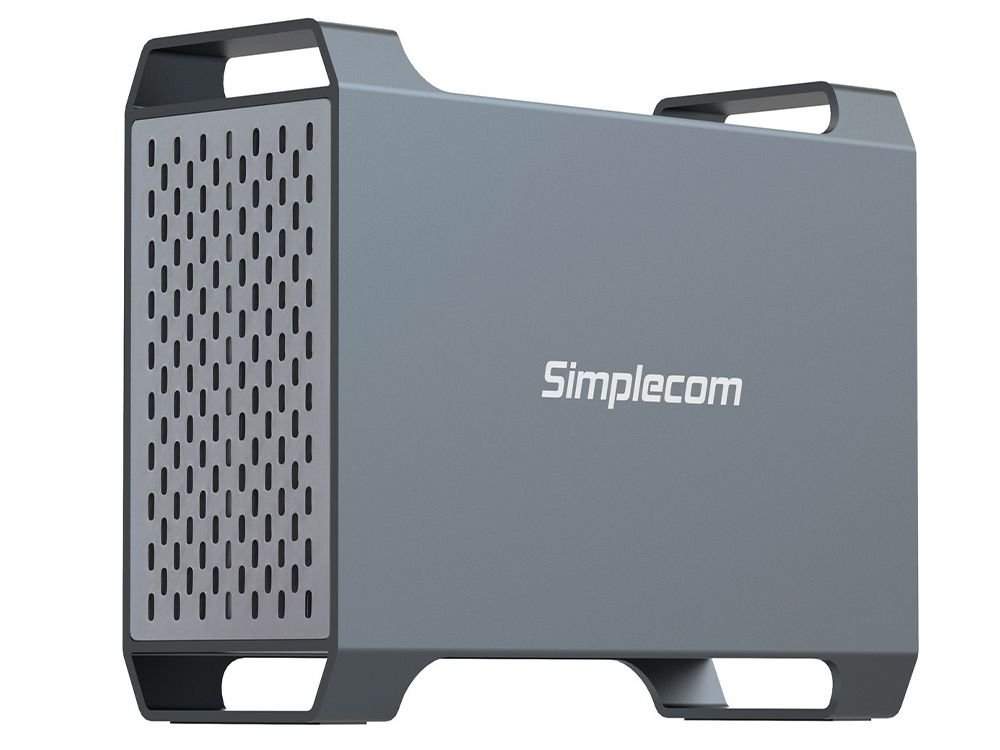
Simplecom SE482 SuperSpeed USB Dual Bay 3.5″ SATA Hard Drive RAID Enclosure USB-C RAID 0/1, JBOD
SE482 a dual bay 3.5″ SATA hard drive enclosure with 4 operating modes, providing various RAID and storage configurations. It can be used to house and manage two 3.5″ SATA hard drives externally.
Convenient and Fast USB-C Interface
Featuring a reversible SuperSpeed USB-C interface to meet the needs of the flexibility and convenience, and you can connect it to your computer with USB-C or USB-A port, supporting SuperSpeed data transfer rate up to 5Gbps.
Durability and Reliability
Aluminum housing for superior heat dissipation and featuring a built-in 5CM silent cooling fan, to ensure efficient cooling for your hard drives during extended operational periods, also provides features for optimal performance and reliability, like temperature controlled fan and auto sleep function.
Four Operating and RAID Modes
This enclosure offers various operating modes, including RAID 0, RAID 1, Large (JBOD) and Normal (Independent) modes. It provides flexibility in terms of storage configuration or data redundancy needs.
- NORMAL: Enclosure operates as a standard external hard drive enclosure with no RAID configuration, treating each drive as an independent storage device. Two hard drives show separate drive letters on computer.
- LARGE (JBOD): In this mode, the drives are presented as a single large drive with no redundancy or striping. e.g. combine 2x 5TB drives to a single 10TB drive. It will merge capacity of 2 hard drives and makes it easy to manage.
- RAID 1: Disk mirroring mode, providing data redundancy and fault tolerance. It’s the replication of data to two HDDs, which makes files can be restored easily when one hard drive is faulty.
- RAID 0: Disk striping mode, dividing data into blocks and spreading the data blocks across two HDDs. This will increase reading and writing speed, but it is not recommended for storing important data. One faulty hard drive will incur loss of entire data.
This dual-bay 3.5″ hard drive enclosure is a versatile storage solution that offers various RAID configurations, fast data transfer, durability, and features to help manage and protect your data, making it a convenient solution for expanding storage capacity, enhancing data security, or configuring drives to suit different needs.
Features
- Dual bay 3.5″ SATA hard drive enclosure with 4 operating modes
- Connect two 3.5-inch SATA hard drives simultaneously
- Support RAID 0, RAID 1, Large (JBOD) and Normal modes
- USB-C interface support SuperSpeed data transfer rate up to 5Gbps
- Auto sleep function, helping to extend the lifespan of HDDs
- Temperature controlled fan for optimal and silent operation
- Aluminium case for durability and excellent heat dissipation
- Plug and play, no additional driver software required
- LED light indicates RAID mode and HDD activity status
- Model: SE482
- Interface: USB-C (USB 3.2 Gen1)
- Transfer Rate: up to 5Gbps
- HDD Support: 2x 3.5″ SATA HDD (no capacity limit)
- Operating Modes: RAID 0, RAID 1, Large, Normal
- Cooling Fan: 5CM (Temperature controlled, only runs when above 48°C)
- Main material: Aluminium, ABS Plastic
- Power Input: DC 12V3A
- Dimensions: 184 x 143 x 65mm (LxWxH)
- Weight: 530g (without HDD)
- Supported Operating Systems: Windows 7 and above, Mac OS 10.8 and above
Package Contents
- 1x Dual Bay HDD RAID Enclosure
- 1x Power Adapter
- 1x USB-C to USB-A Cable
- 1x USB-C to USB-C Cable
- 1x Screws set
IMPORTANT NOTE:
- Please read the user manual carefully before using the product
- Changing of RAID mode will erase ALL data on hard drives, please backup important data before changing of RAID mode
- Temperature controlled fan turns on automatically only when temperature is above 48°C
| 5 | ☆ | |
| 4 | ☆ | |
| 3 | ☆ | |
| 2 | ☆ | |
| 1 | ☆ |
- User Reviews (8)
- Write Review
Small and compact, easy to use.
The fan is to slow to kick in when using the device for a period of time, need to start at a lower temperature.
Would have beenn better to have 2 UCB-C ports to daisy chain, I am using two of the devices and have to use a hub or 2 UCB-C ports on my pc
An excellent, simple and robust case. Easy to configure.
I am running two of these enclosures (four HDD) in two different configurations and they are doing exactly what it says on the box.
My only issue is that the ‘feet’ need soft rubber to sit on as the HDD vibration can get a bit noisy on my desk (not the most robust desk, I should add).
Other than that, I recommend them as an easy to use solution for backing up your files.

Fantastic multi-drive enclosure. It does exactly what I needed it for, connecting two drives to a computer as if they were one.
Changing the mode is done with a hardware switch which requires a tiny screwdiver to reach. If this switch is changed during operation, it does cause corruption, so understandable why this is designed to not be switch accidentally.
The outer case slides off the main body. In fact, it’s possible to use it without the case at all, which may be more convenient if switching drives often.
Although the outer case is metal, the body is plastic. The method of installing the drives involves bending the SATA connector at an upright angle and then snapping down; it’s designed to do this but it doesn’t feel comfortable.
I’ve had no issues with it. Turns on and connects the moment you send power to it. It does use its own power source.
•
I bought this enclosure some time ago. It is solid, well made and I haven’t had any issues with it using it just as an external hard drive enclosure case for occasional storage with a couple of drives.
However I have noted that the small exhaust fan has never activated even when the drives were going flat out for a couple of hours transferring a lot of movie files and the external casing was correspondingly very warm to the touch.
Another user in these reviews has stated the fan doesn’t kick in until the internals get until around 48 degrees C – clearly way too warm for an expensive drive or two inside a constrained enclosure. I have written to Simplecom Support to ascertain whether the temp threshold is correct or not and if so, why so high ? Given my own observations I have no reason to believe the previous user’s comment is not accurate.
•
I would strongly urge anyone buying this NOT use it as an external storage that will run 24/7… it will overheat your hard drives!!
The cooling fan is thermally controlled & doesn’t start until 48C – which is crazy when every hard disk manufacturer specifies the ideal operating temperature range of a drive as 25C to 45C!!!
My two 8TB NAS drives ran at over 50C each (they peaked at 54C even AFTER the fan kicked in!!) so I immediately shut it down & removed the drives.
I’m now using this enclosure with a couple of standard 4TB drives purely for backing up – start it up, run your back up & then shut it down again… that’s about all it’s good for. Good luck!!!
This is a great way to add extra data storage to a PC. It was easy to set up and looks great on the desk. Very satisfied.
Does the job nicely….Recommended
Works well. Decent quality.
Reviews
There are no reviews yet.